How to Bypass or Remove iCloud Activation Lock from iOS 12
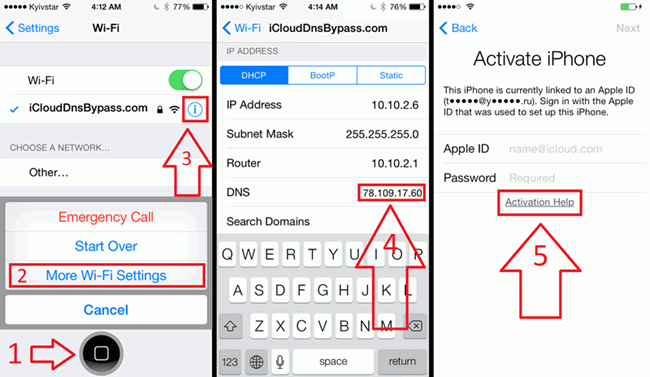
Try DNS Method to Perform iOS 12 Activation Lock Removal
This is a trick to remove iCloud activation lock in iOS 12. Many iOS 12 users have testified that this trick worked for them but others say it never worked. We believe it’s worth a try because it may work for you.
Step 1. Reboot your iPhone, start the setup process and select your country & Language.
Step 2. Choose a Wi-Fi network and connect to it. Then scroll down to “DNS” and type in one of the following digits based on your region:
USA/North America: 154.51.7
Europe: 155.28.90
Asia: 155.220.58
In the rest of the world: 109.17.60
Step 3. Click “Back” on the top left corner of your screen. Click on your Wi-Fi network again to enter your Wi-Fi password, and tap “Join”.
Step 4. Tap the “Back” tab at the button of the page, and your iPhone will try to activate and go to a new page. Quickly back “Back” tab at the top right corner of your page, and you will be on the Wi-Fi page.
Step 5. Now, you should be seeing “iCloudDNSBypass.net” at the top. Scroll and tap on the menu icon so that you can access apps and several features.
Step 6. Choose any app that will give you the right information about the owner of the app, so that you can contact him/her to remove iCloud Activation lock from the iPhone.
Perform iOS 12 Activation Lock Removal Using Unlock Service
iPhoneIMEI.net is a trusted service for unlocking iOS 12 iCloud activation lock. However, this service is not free; it charges $50 USDper iPhone unlock. You will also have to exercise patience for 3 days before your iPhone is fully unlocked.
Here is how to use the service:
Step 1. Go to iPhoneIMEI.net website, select the model of your iPhone, and provide your iPhone’s IMEI number. You can get this from the back of your iDevice.
Step 2. Choose your iPhone model, and provide the IME number.
Step 3. Click the “Unlock Now!” tab, and enter your credit card details to make payment. You can enter your email address if you want to be getting notifications about the unlock process.
Step 4. Click “Buy Now!” tab to offer your payment details. You’ll have to wait for 1-3 days.

Jihosoft iPhone Backup Extractor Extract and recover all types of data from iPhone backup files, such as camera roll photos, videos, SMS, contacts, reminders, WhatsApp, and etc.
Gihosoft Free iPhone Data Recovery is a professional iPhone Data Recovery software to get back all your lost text message, photo, video, call history, note, contact and more from iPhone/iPad/iPod Touch.
You may also like:
How to transfer messages from iPhone to iPhone
Any app suggestions or topic recommendations are appreciated in the comments down below.

Nema komentara:
Objavi komentar